
HOME
GUIDES
SHOP
MORE
Jump to
How to Buy Robux Using GCash
TUTORIALS
Nov 10, 2025 by
Asher Hayes
42479 107
If you play Roblox, you may already know the role of Robux in unlocking upgrades, avatar items, accessories, and game passes. It’s a free game, but the fun stuff is behind those Robux paywalls. Philippine players are always looking for the easiest way to top up Robux, and GCash is the easiest, fastest, and safest way to do so. Before we get to the details, here’s the thing: platforms like Cocodp also provide reliable digital top-ups, so Filipino players have more options than ever.
This guide simplifies each method in an easy-to-understand way. Whether you buy on mobile, PC, Android, iPhone, or with GCash, you’ll find an option that fits you. The goal is simple: help you buy Robux using GCash with no confusion.
Option 1: Buy Robux on mobile (Android/iPhone) via GCash
Below are the steps to buy Robux using GCash on either an iPhone or an Android phone.
To start with, do not open the Roblox application. Rather, open your browser and visit roblox.com. Please ensure that you are logged in. When you are signed in, you look at the top right part of the screen. The ‘Robux icon’ will appear next to the settings icon. Click the Robux icon.
From there, select the ‘Buy Robux’ option. You will now have the number of ‘Robux packages’ available. You can choose any package or subscription of your choice. So, as an example, we can take the 100 Robux package.
Once you have chosen your package, then you have to select GCash as your mode of payment. If you do not have GCash right away, scroll down and choose ‘Other.’ This will indicate additional payment options.
If GCash is still not visible, you should switch the country setting. There will be an option of ‘Change Country’ at the top right or at the bottom of the payment screen. Click it and change the country to the Philippines since GCash is limited only to that region.
After switching the country to the Philippines, GCash should appear. In some cases, it appears with Alipay due to their payment partnership, so do not be confused. All you need to do is find the GCash logo and tap it.
Then you will be required to complete some basic information, such as your email. Enter the information and click Continue.
A checkout page will display a QR code. Launch the GCash app on your phone, use the QR scanner, and scan the code. You will be requested to approve the payment in GCash. Approve the transaction.
Once this is confirmed, the payment will process, and the Robux will be added to your Roblox account.
That is all you need to purchase Robux using GCash on a mobile device.
Option 2: Purchase Robux on your PC using a GCash card
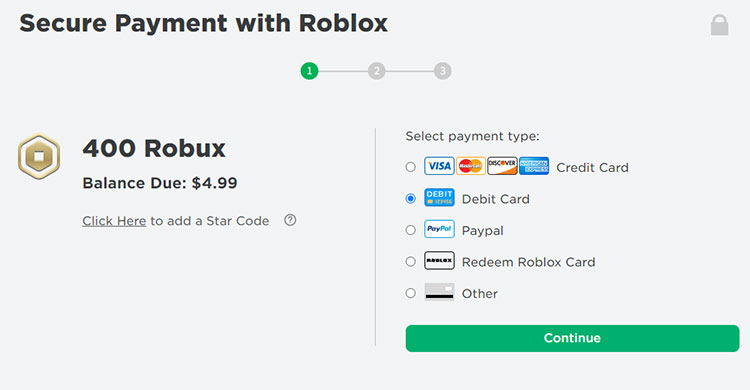
If you prefer to use a laptop or desktop, here’s how you can buy Robux online using your GCash-issued virtual card.
Visit Roblox.com and sign in to your Roblox account. Find the Robux icon and click on it.
Select the package of Robux that you desire (they usually appear in US dollars).
In the payment method, choose Debit Card (or whatever option allows the entry of a card).
Input GCash Mastercard details or GCash American Express Virtual Pay Card details: card number (16 digits), card expiry date, and CVV2/CVC2. The value will be presented in Philippine pesos (converted).
You can enter your email address to receive a receipt (not mandatory) and then click Pay now.
Just wait a few seconds, and your Robux credits will be credited to your account once the transaction is completed.
Option 3: Buy Robux with GCash directly (game credits)
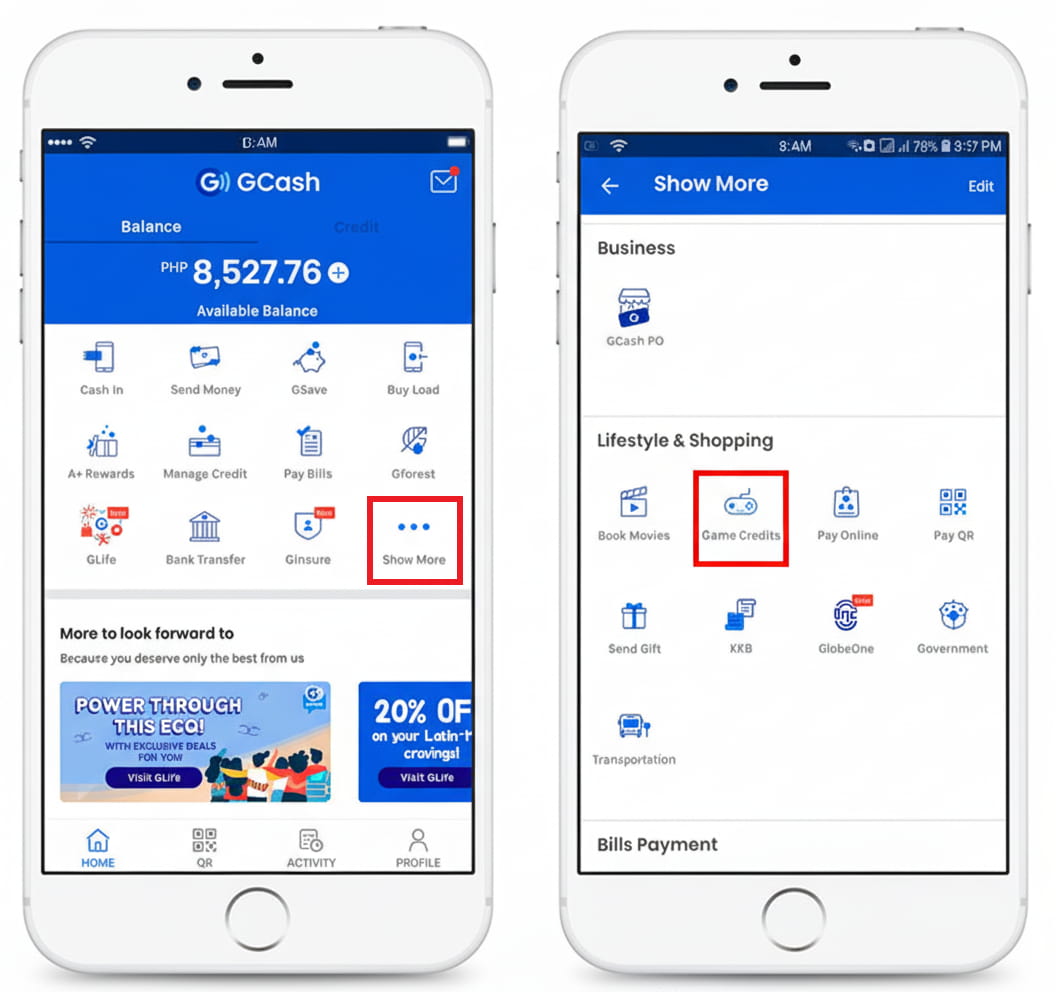
There is another method you can use to buy game credits inside the GCash app, which can be redeemed into Robux. Here's how:
Open the GCash app and log in to your GCash account.
You will see a lot of options there - tap ‘View All.’
In the ‘Pay’ category, there will be ‘Game Credits.’
Tap Next, in case you are sending the code to yourself, or fill in contact details in case you are sending it to another person.
Go to the ‘Roblox’ tab and choose the amount of Robux you would like. Tap "Next."
Review payment details. Tap "Pay."
You will receive an SMS that will have the code for the game credits and the instructions on how to redeem it. To redeem: Access the Roblox gift card redemption page and enter the code.
The Robux will be credited to your account.
This is also a favorite option of parents who would want to transfer Robux to their children without giving direct access to their GCash account.
Option 4: Where to Safely Buy Robux Online
There are players who simply choose to purchase gift cards instead of connecting accounts. In that case, services such as Cocodp would be very helpful.
The official Roblox gift cards at Cocodp Philippines are one of the reliable ways to purchase digital Roblox cards immediately.
You’ll receive the code instantly, and you can redeem it on the same Roblox redemption page. This method works best if you want tighter control over your spending.
FAQs
1. Do Robux purchased through GCash arrive instantly?
Usually within minutes. Sometimes GCash Game Credits take around 5 minutes.
2. Is it safe to buy Robux through GCash?
Yes. One of the most secure and safe digital wallets in the Philippines is GCash, and Roblox accepts it.
Final Thoughts
Roblox has a currency called Robux, and now Filipino players have several easy options when it comes to how to buy Robux using GCash. You can buy it all with ease, whether you wish to buy it through your phone, your PC, or even using your debit card details or using the direct game credits. If you do not want to link your accounts but prefer digital gift cards, you can find a convenient and quick option with trusted stores such as Cocodp Philippines.
107
Share this


Asher Hayes
Asher is an SEO specialist writing for the gaming community, covering mobile and PC games, top-up guides, and tips to make gaming more enjoyable.
You may also like

The Top 10 Mage Heroes in MLBB Based On The Recent Patch
REVIEW
Nov 11, 2025 by
Asher Hayes
Out of the dozen heroes, ML mage heroes are some of the most mechanically difficult yet satisfying heroes to play. They control the battlefield with truly powerful burst damage, crowd control, and game-changing ultimates that can make or break any match. As the meta continues to evolve, certain MLBB mages have become so dominant in competitive play and ranked matches that they can no longer be ignored. Players using Cocodp can quickly unlock these powerful mages and start dominating ranked m (truncated)...

Top 10 Japanese Horror Games Every Scare-Lover Should Play
REVIEW
Oct 30, 2025 by
Asher Hayes
The Japanese horror games are famous across the world due to psychological fear, the horrifying storyline, and the frightening experience of encountering ghosts based on folklore. Whether you are wandering through haunted villages, haunted hospitals, or incurring the wrath of the ghosts, there is always a feeling of fear that lingers even after you have stopped playing. If you are looking for Japanese horror games , you are seeking the memorable tales, haunting spirits, and gloomy a (truncated)...
Best Sensitivity for PUBG Mobile 2025: Ultimate Guide for Android and iOS
TUTORIALS
Nov 6, 2025 by
Asher Hayes
If you were missing an important headshot or lost control during a spray, it wasn't your aim that was the issue, but it was your sensitivity. Discovering the best sensitivity for PUBG Mobile is the key to the smoothness of recoil, fast reflexes, and accurate tracking. With new changes and differences in devices in 2025, it will be more important than ever to tune your setup. This blog post divides the optimal PUBG Mobile sensitivity settings for both Android and iOS users, includin (truncated)...
How to Safely Claim Free Diamonds in Mobile Legends
TUTORIALS
Sep 30, 2025 by
Asher Hayes
For any passionate player of Mobile Legends: Bang Bang (MLBB), diamonds are the most important in-game currency. This shiny premium currency is used to unlock heroes, get skins, and join events. It’s no wonder players are constantly seeking ways to claim free diamonds in Mobile Legends . However, this desperation has led to many scams in the past that promised players easy diamonds but delivered nothing but frustration and risk. This guide will walk you through the safe, legitimate, a (truncated)...

Chinese New Year Gaming Carnival - Double-Platform Bonanza Galore! Grab the Freebies, Gamers!
PROMO
Feb 16, 2026 by
Asher Hayes
Got nothing to do staying home during the Chinese New Year holiday? Look here! The Chinese New Year Gaming Carnival is absolutely killing it! PUBG Mobile and MLBB are teaming up to bring you exclusive limited skins, huge discounts, and free lucky draws—no tricks, no gimmicks, just straight-up awesome perks for us gamers. You can score tons of fun playing games at home, so jot down this list stat! Let’s start with PUBG Mobile. The Lunar New Year Weapon Skin Event has been live for days, (truncated)...
Copyright © 2026 Cocodp. All Rights Reserved.
